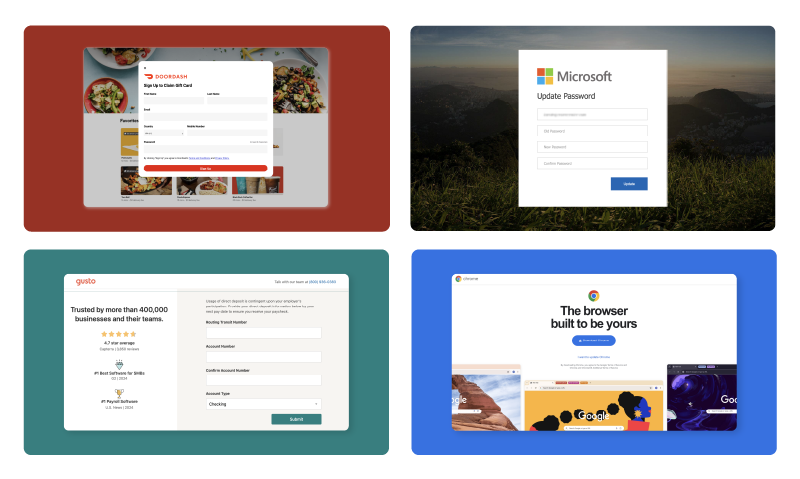
TL;DR: How to recognize phishing emails
- Phishing emails exploit trust and urgency. Attackers impersonate coworkers, executives, and familiar brands to steal credentials, money, or sensitive information.
- Explore 20 phishing email examples, including:
* Fake invoices
* Microsoft 365 password alerts
* Delivery notifications
* AI‑generated attacks - Know the warning signs: watch for suspicious sender addresses, unexpected links or attachments, requests for sensitive information, and pressure to act immediately.
- Regular practice, including phishing simulations, employee training, and timely feedback, helps employees recognize threats and respond appropriately.
The best training to help employees recognize phishing and social engineering attempts combines real-world phishing email examples with clear breakdowns of the red flags that expose each attack. Showing your team what actual phishing emails look like, from fake invoice requests to credential harvesting schemes, builds pattern recognition that generic warnings cannot achieve. This guide presents 20 phishing email examples organized by attack type, with detection guidance your organization can put into practice immediately.
We'll walk through:
What is a phishing email?
A phishing email is a fraudulent message designed to trick recipients into revealing sensitive information, clicking malicious links or taking actions that compromise security. These attacks impersonate trusted entities (banks, colleagues, software providers or shipping companies) to exploit human trust and urgency.
Phishing represents one of the most persistent threats facing organizations today. Unlike technical exploits that target software vulnerabilities, phishing targets people. The attacker's goal is to bypass security controls entirely by convincing an employee to hand over credentials, transfer funds or download malware.
The term "phishing" derives from the idea of fishing for victims, using bait (a convincing fake email) to hook targets. Modern phishing has evolved far beyond the obvious scam emails of the past. Today's attacks use sophisticated social engineering, pixel-perfect brand impersonation and carefully researched targeting to deceive even security-conscious employees.
Understanding the A to Z of security awareness provides essential context for why phishing remains the attack vector of choice for cybercriminals worldwide.
Why phishing attacks still work in 2026
Phishing attacks continue to succeed because they exploit fundamental human psychology (trust, urgency, fear and helpfulness) rather than technical vulnerabilities that can be patched. Even organizations with robust security infrastructure remain vulnerable when employees cannot recognize the social engineering tactics embedded in these messages.
Several factors explain why phishing remains devastatingly effective:
Attackers have access to better intelligence. Social media profiles, corporate websites and data breaches provide attackers with the personal and professional details needed to craft convincing, targeted messages. A fake email referencing your actual job title, recent company announcement or colleague's name is far more believable than a generic scam.
Attack sophistication has increased dramatically. AI-generated content allows attackers to produce grammatically flawless messages at scale. Brand impersonation has reached the point where fake emails are visually indistinguishable from legitimate communications. Multi-channel attacks combine email with text messages, phone calls and even physical mail to build credibility.
The volume of attacks overwhelms human vigilance. Employees process hundreds of emails weekly. Maintaining constant suspicion is cognitively exhausting, and attackers know that a single lapse in judgment is all they need.
Breakout times have compressed. According to current threat intelligence, attackers move from initial compromise to lateral movement faster than ever, meaning a clicked phishing link can escalate to a full breach before security teams can respond.
The state of cybersecurity data confirms that human-targeted attacks continue to outpace purely technical exploits, making employee training the most critical defensive investment organizations can make.
20 phishing email examples by attack type
Understanding phishing requires seeing what these attacks actually look like. The following 20 examples are organized by attack category, with each example explaining what the email is, why it works psychologically, who it typically targets and how to identify the red flags.
Business email compromise (BEC)
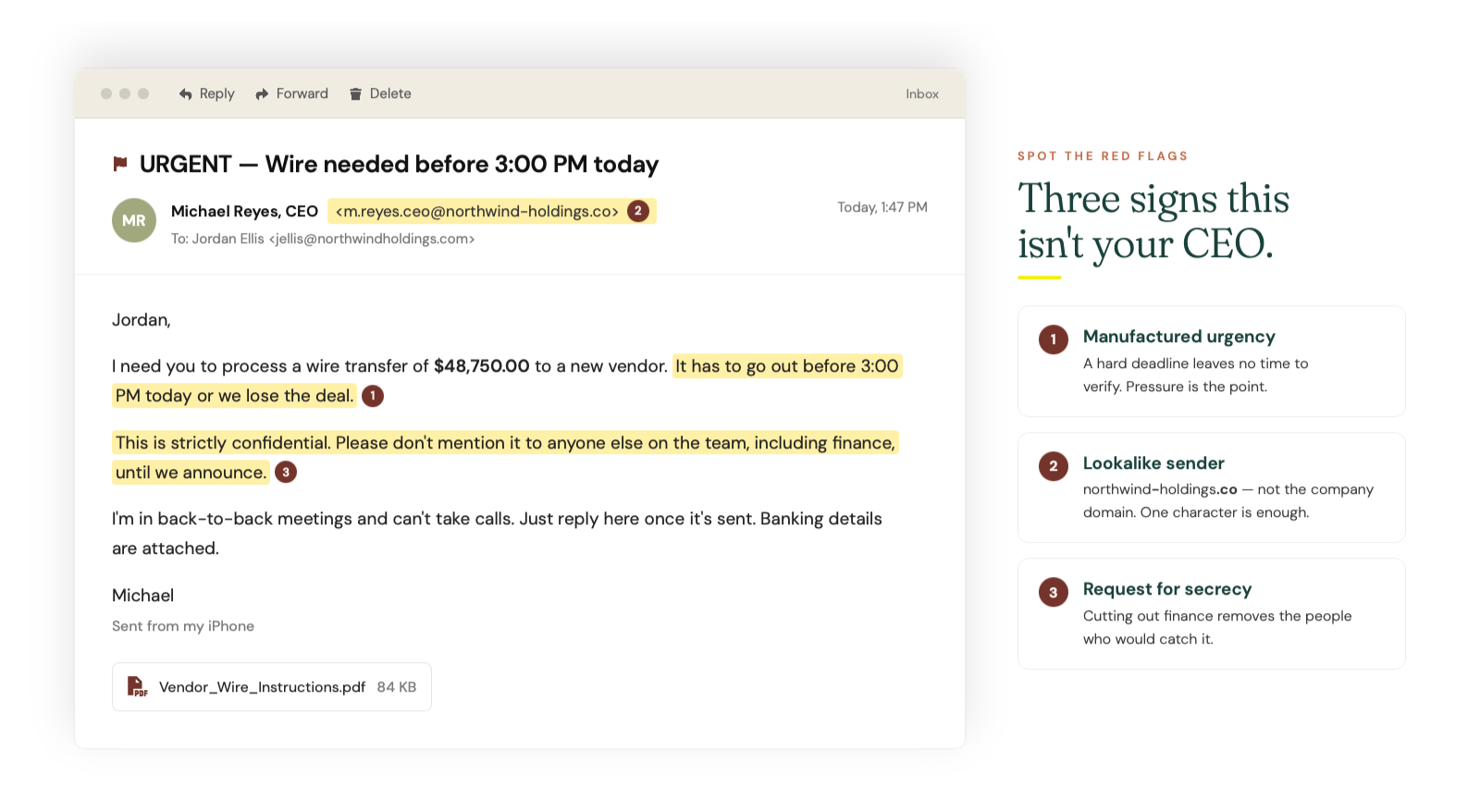
Example 1: CEO Wire Transfer Request
The email appears to come from the company CEO, urgently requesting a wire transfer to close a confidential acquisition. It targets finance department employees and works because it leverages authority and secrecy. Red flags include unusual sender addresses, pressure to bypass normal approval processes and requests to keep the transaction confidential.
 Example 2: Vendor Payment Redirect
This message claims to be from a known vendor, informing accounts payable that banking details have changed. It targets anyone who processes payments and exploits established business relationships. Red flags include requests to update payment information via email rather than through verified channels and subtle differences in the sender's email domain.
Example 3: HR Benefits Update
Appearing to come from human resources, this email asks employees to confirm or update direct deposit information for benefits enrollment. It targets all employees and works because benefits changes are routine. Red flags include links to external sites rather than internal HR portals and requests for full banking credentials.
Example 4: Executive Travel Emergency
The email claims a traveling executive has lost their wallet and needs emergency funds wired immediately. It targets executive assistants and finance staff, exploiting helpfulness and urgency. Red flags include unusual communication channels, pressure to act before verifying and requests that bypass standard procedures.
Credential harvesting
Example 5: Microsoft 365 Password Expiration
This fake email warns that your Microsoft 365 password will expire within 24 hours and provides a link to "update" credentials. It targets all employees using Microsoft services and works because password expiration notices are common. Red flags include generic greetings, mismatched URLs when hovering over links and threats of immediate account lockout.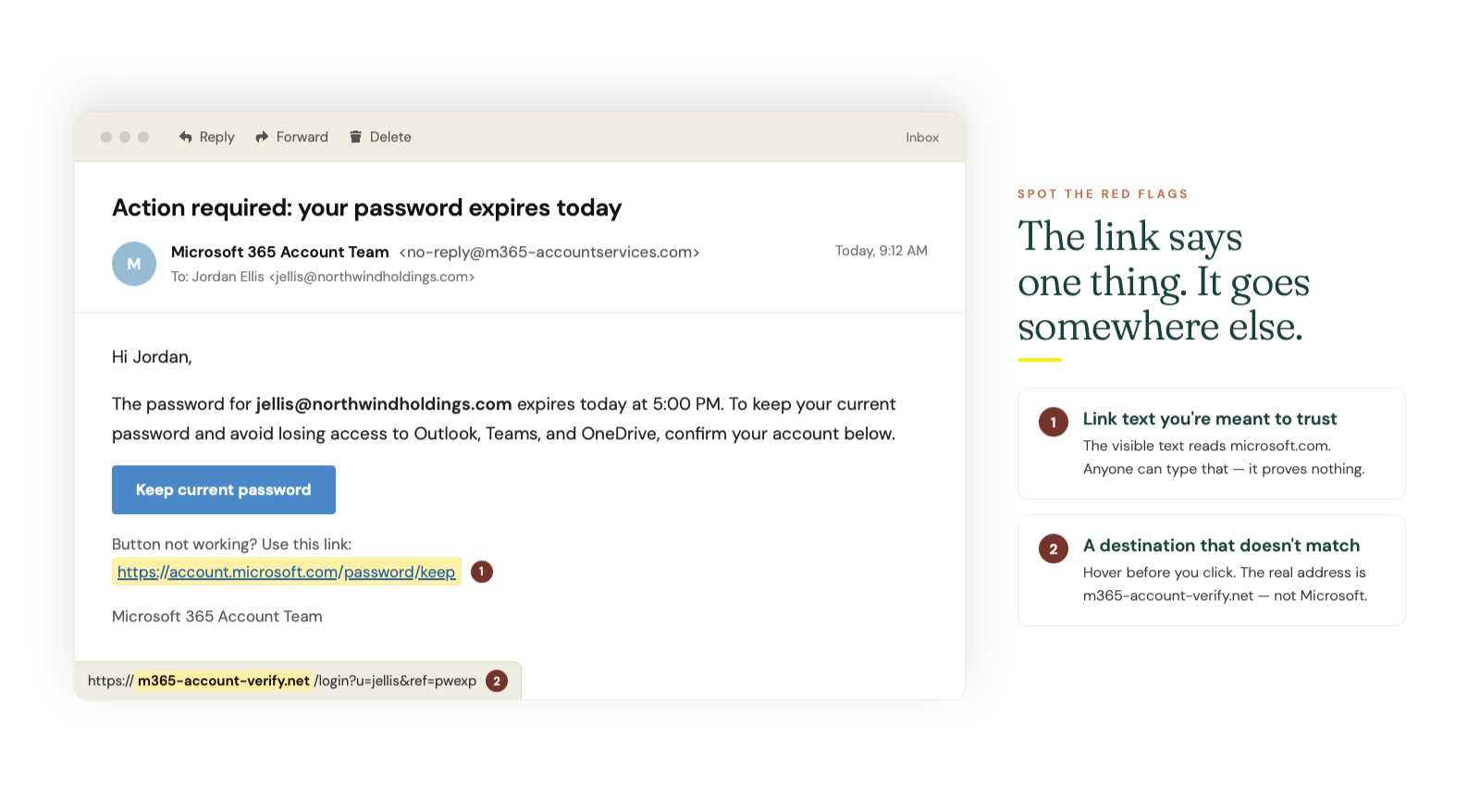
Example 6: Outlook Email Login Verification
The message claims suspicious activity was detected on your account and requires immediate verification through a provided link. It targets anyone with an email account and exploits fear of being hacked. Red flags include urgent language, links that don't match the legitimate domain and requests to enter credentials on external pages.
Example 7: Google Drive Shared Document
This email notifies you that someone has shared an important document, with a link to view it. It targets anyone who uses cloud collaboration tools and works because document sharing is routine. Red flags include unexpected shares from unknown contacts, links that redirect through unfamiliar domains and requests to log in again despite already being authenticated.
Example 8: IT Support Password Reset
Appearing to come from internal IT, this email states your password was reset due to a security incident and provides a link to create a new one. It targets all employees and exploits trust in IT communications. Red flags include unsolicited password reset links, sender addresses that don't match internal IT domains and pressure to act immediately.
Delivery and shipping scams
Example 9: Failed Package Delivery
This message claims a package could not be delivered and requires you to click a link to reschedule or pay a small fee. It targets anyone who shops online and works because delivery issues are common. Red flags include vague package details, requests for payment via unusual methods and links to non-carrier domains.
Example 10: Customs Fee Required
The email states an international shipment is held at customs pending payment of fees, with a link to pay and release the package. It targets anyone expecting international deliveries and exploits urgency around delayed shipments. Red flags include unexpected fees, pressure to pay quickly and sender addresses that don't match legitimate customs or carrier domains.
Example 11: Order Confirmation You Didn't Place
This fake email confirms a large purchase you never made, with a link to "cancel" or "dispute" the order. It targets anyone with online shopping accounts and works by triggering alarm about unauthorized charges. Red flags include orders you don't recognize, links that don't go to the actual retailer's site and requests to log in to verify your account.
Financial and banking phishing
Example 12: Bank Account Suspension Notice
The message warns that your account has been suspended due to suspicious activity and requires immediate verification. It targets anyone with bank accounts and exploits fear of losing access to funds. Red flags include generic greetings, threats of permanent closure and links to sites that mimic but don't match the bank's actual domain.
Example 13: Tax Refund Notification
This email claims you're owed a tax refund and provides a link to submit banking information for direct deposit. It targets taxpayers and works because refunds are desirable. Red flags include unsolicited refund notices, requests for full banking credentials and sender addresses that don't match official tax authority domains.
Example 14: Invoice Payment Request
Appearing to come from a vendor or service provider, this email attaches a fake invoice and requests immediate payment. It targets finance and accounts payable staff and works because invoice processing is routine. Red flags include unexpected invoices, attachments from unknown senders and payment instructions that differ from established vendor relationships.
Spear phishing and targeted attacks
Example 15: LinkedIn Connection Follow-Up
This email references a recent LinkedIn connection and includes a link to a "proposal" or "opportunity." It targets professionals active on LinkedIn and works because it references real social media activity. Red flags include attachments or links from new connections, requests to download files and sender addresses that don't match LinkedIn's domain.
Example 16: Conference Registration Confirmation
The message confirms registration for an industry conference you may have attended or expressed interest in, with a link to download your badge or agenda. It targets professionals in specific industries and exploits legitimate conference participation. Red flags include conferences you didn't register for, links to download executable files and sender addresses that don't match the conference organizer.
Example 17: Job Application Follow-Up
Appearing to come from a company you applied to, this email requests additional information or asks you to complete an online form. It targets job seekers and works because applicants expect employer communications. Red flags include requests for sensitive personal information early in the process, links to non-company domains and vague references to the position.
Emerging attack types
Example 18: QR Code Phishing (Quishing)
This email contains a QR code that recipients are instructed to scan to verify their identity, access a document or complete a security check. It targets employees in any organization and works because QR codes obscure the destination URL. Red flags include unexpected QR codes in emails, instructions to scan codes for routine tasks and pressure to act quickly.
Example 19: AI-Generated Spear Phishing
This highly personalized email references specific projects, colleagues or recent activities, requesting action that appears legitimate. It targets high-value individuals and works because the personalization suggests insider knowledge. Red flags include unusual requests even from known contacts, subtle inconsistencies in tone or writing style and requests that bypass normal verification processes.
Example 20: Multi-Channel Attack Setup
The email references a voicemail, text message or previous communication and asks you to take action to resolve an issue. It targets anyone and works because the apparent multi-channel contact builds credibility. Red flags include references to communications you don't recall, pressure to act without verifying through independent channels and requests to provide information you wouldn't normally share via email.
Red flags: how to spot a phishing email
Recognizing phishing emails requires checking for specific warning signs that distinguish fraudulent messages from legitimate communications. Train your team to pause and evaluate every email against these criteria before clicking links, opening attachments or taking requested actions.
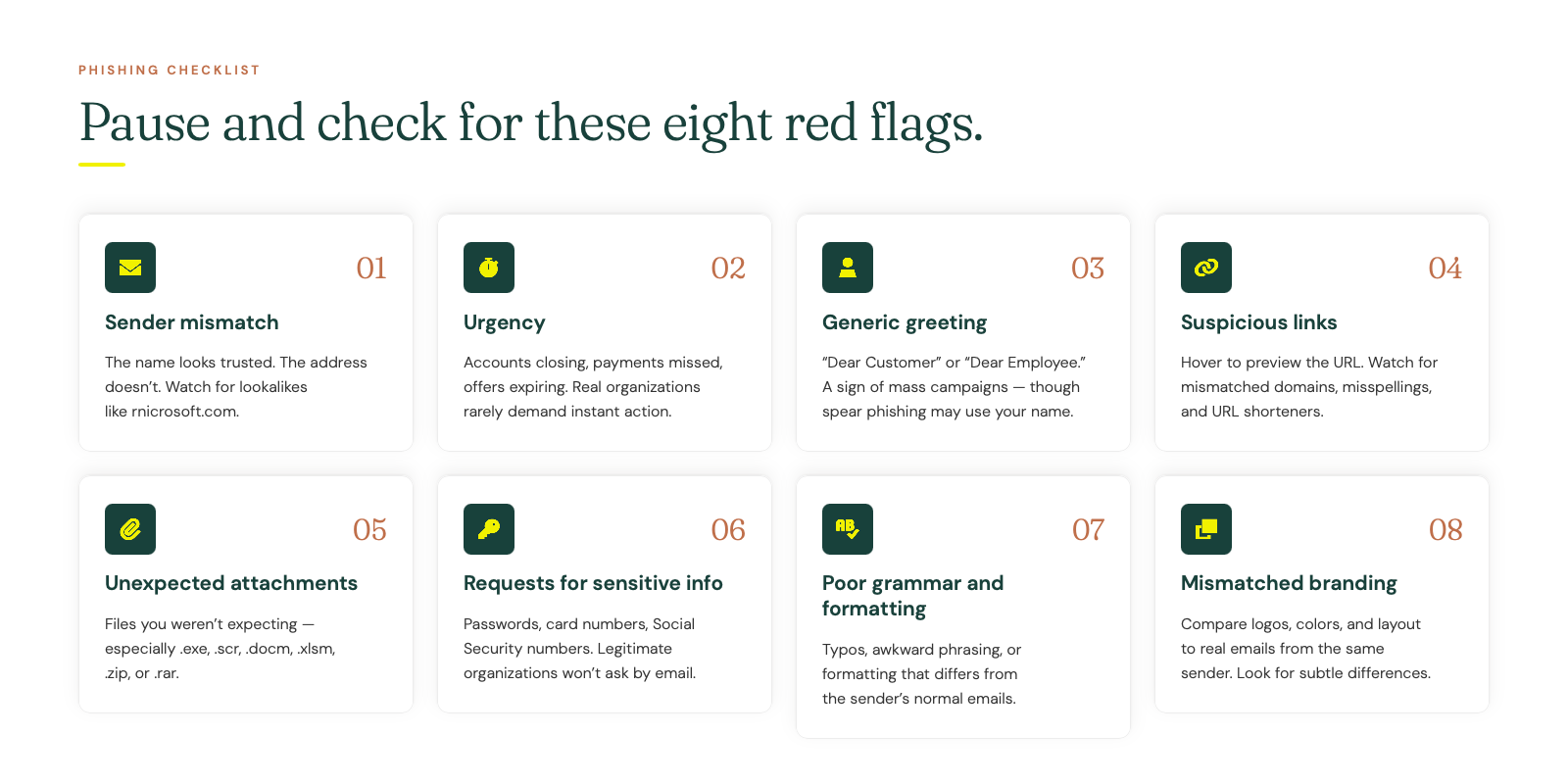 Sender address mismatches. The display name may show a trusted contact, but the actual email address reveals a different domain. Hover over or click on the sender name to reveal the full address. Look for subtle misspellings like "rnicrosoft.com" instead of "microsoft.com" or domains that add extra words like "microsoft-security.com."
Urgency and pressure tactics. Phishing emails frequently create artificial time pressure. Accounts will be closed, payments will be missed or opportunities will expire unless you act immediately. Legitimate organizations rarely demand instant action via email.
Generic greetings. Messages addressed to "Dear Customer," "Dear User" or "Dear Employee" rather than your actual name often indicate mass phishing campaigns. However, targeted spear phishing may use your real name, so this alone isn't definitive.
Suspicious links. Before clicking any link, hover over it to preview the destination URL. Look for domains that don't match the supposed sender, misspelled company names or URLs that use URL shorteners to hide the true destination.
Unexpected attachments. Be especially cautious of attachments you weren't expecting, particularly executable files (.exe, .scr), Office documents with macros (.docm, .xlsm) or compressed archives (.zip, .rar).
Requests for sensitive information. Legitimate organizations will not ask you to provide passwords, full credit card numbers or Social Security numbers via email. Any such request is a red flag.
Poor grammar and formatting. While AI has improved phishing quality, many attacks still contain spelling errors, awkward phrasing or formatting inconsistencies that differ from the organization's normal communications.
Mismatched branding. Compare logos, colors and formatting to legitimate emails from the same organization. Phishing emails often have subtle differences in visual presentation.
How to use these examples for employee training
The most effective approach to using phishing email examples for training is to move beyond passive awareness and into active recognition practice. Simply showing employees examples once is insufficient. Building lasting pattern recognition requires repeated exposure, hands-on exercises and a supportive learning environment.
Start with real examples, not abstract concepts. Use the examples in this guide as conversation starters in team meetings or training sessions. Walk through each example, asking employees to identify the red flags before revealing them. This active engagement builds stronger recall than passive reading.
Implement simulated phishing campaigns. Understanding what a successful simulated phishing training program looks like helps you move from awareness to measurable behavior change. Simulations provide safe opportunities for employees to practice recognition skills and learn from mistakes without real consequences.
Create a blame-free reporting culture. Employees who fear punishment for clicking phishing links will hide incidents rather than report them. Approaching cybersecurity awareness without fear encourages the rapid reporting that limits breach damage.
Tailor examples to your organization. Generic phishing examples are useful, but training becomes more relevant when you include examples that mimic the specific vendors, tools and communication patterns your employees encounter daily.
Reinforce learning over time. One-time training fades quickly. Strategies to improve security awareness training emphasize ongoing reinforcement through regular simulations, brief refresher content and timely reminders when new threat patterns emerge.
Measure and iterate. Track phishing simulation click rates, reporting rates and time-to-report metrics. Use this data to identify which attack types your employees struggle with most and focus future training accordingly.
Protect your organization from phishing with BrainStorm
Reducing phishing risk requires more than showing employees a list of examples. It demands a systematic approach that combines awareness education with practical simulation and continuous reinforcement. Organizations that treat phishing defense as a one-time training event consistently underperform those that build ongoing security cultures.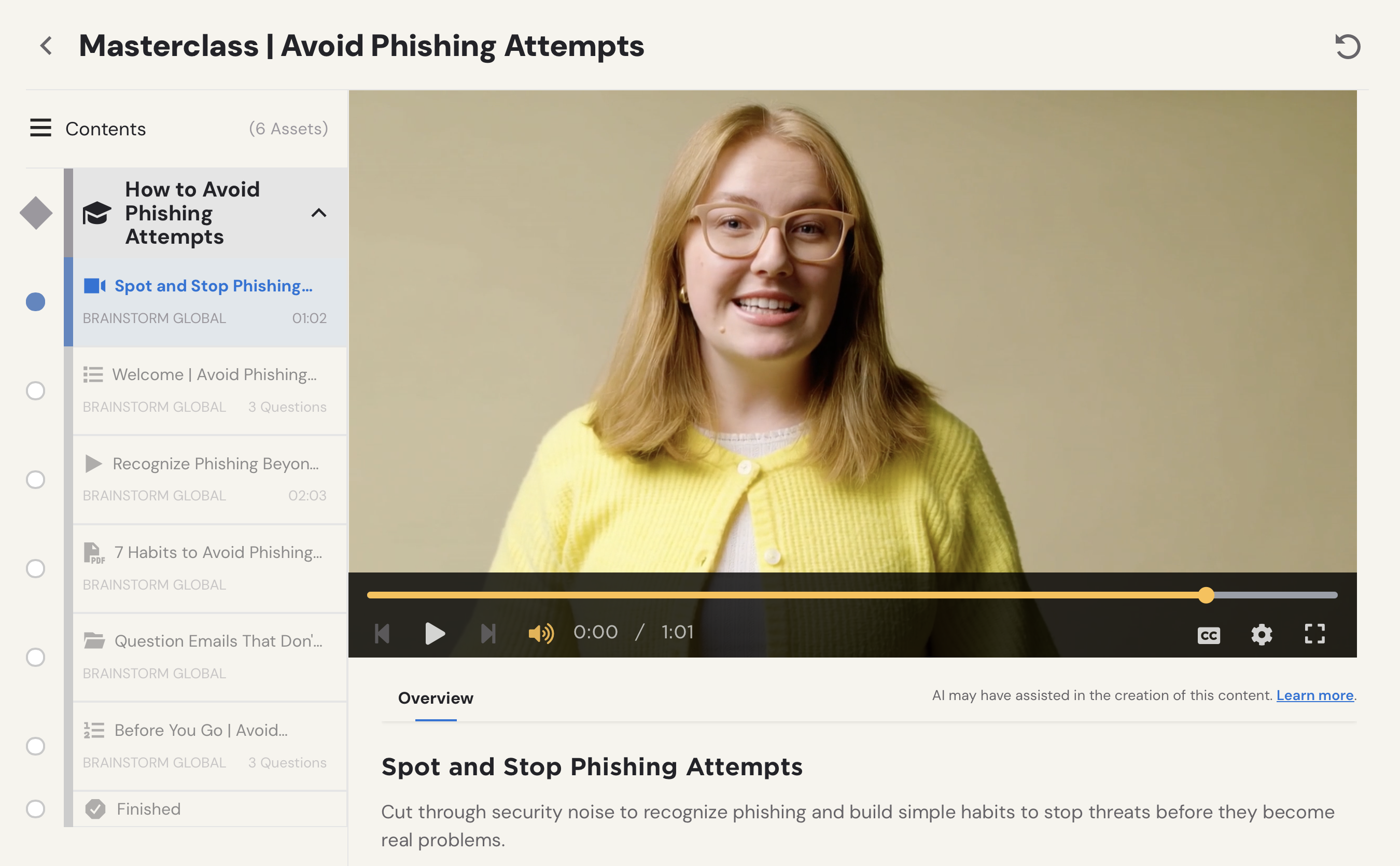
The combination of security awareness and phishing simulation creates a one-two punch that builds genuinely secure users. Awareness provides the knowledge foundation, while simulation provides the practice that turns knowledge into reflexive behavior.
Many organizations struggle with employee resistance to security training. Understanding why people hate security awareness training and how to fix it helps you design programs that employees actually engage with rather than click through mindlessly.
BrainStorm's security awareness platform delivers the training-grade phishing examples, simulated campaigns and reinforcement tools that Security Gatekeepers need to demonstrably reduce click rates. For Compliance Champions in regulated industries, the platform provides documentation and reporting that satisfies audit requirements while genuinely improving staff security awareness. And for Small Business Protectors working with limited budgets, BrainStorm offers practical, easy-to-deploy training that doesn't require hiring expensive consultants.
The cost of a successful phishing attack (data breaches, ransomware payments, regulatory fines and reputational damage) dwarfs the investment in effective training. One trained employee who recognizes and reports a phishing attempt can prevent losses that would otherwise reach hundreds of thousands of dollars.
Send 100 phishing test emails
Get our free phishing simulation tool